Every email account in MailBeast has a Health Score from 0 to 100 that reflects its overall deliverability potential. The score gives you a quick way to assess whether an account is in good shape to send campaigns or needs attention.
Go to the Email Accounts page - the Health Score is visible in the account list.
Click on any account to see the detailed breakdown in the Overview tab.
The breakdown shows each component's contribution to the total score.
Hover over individual items for more context on what is affecting your score.
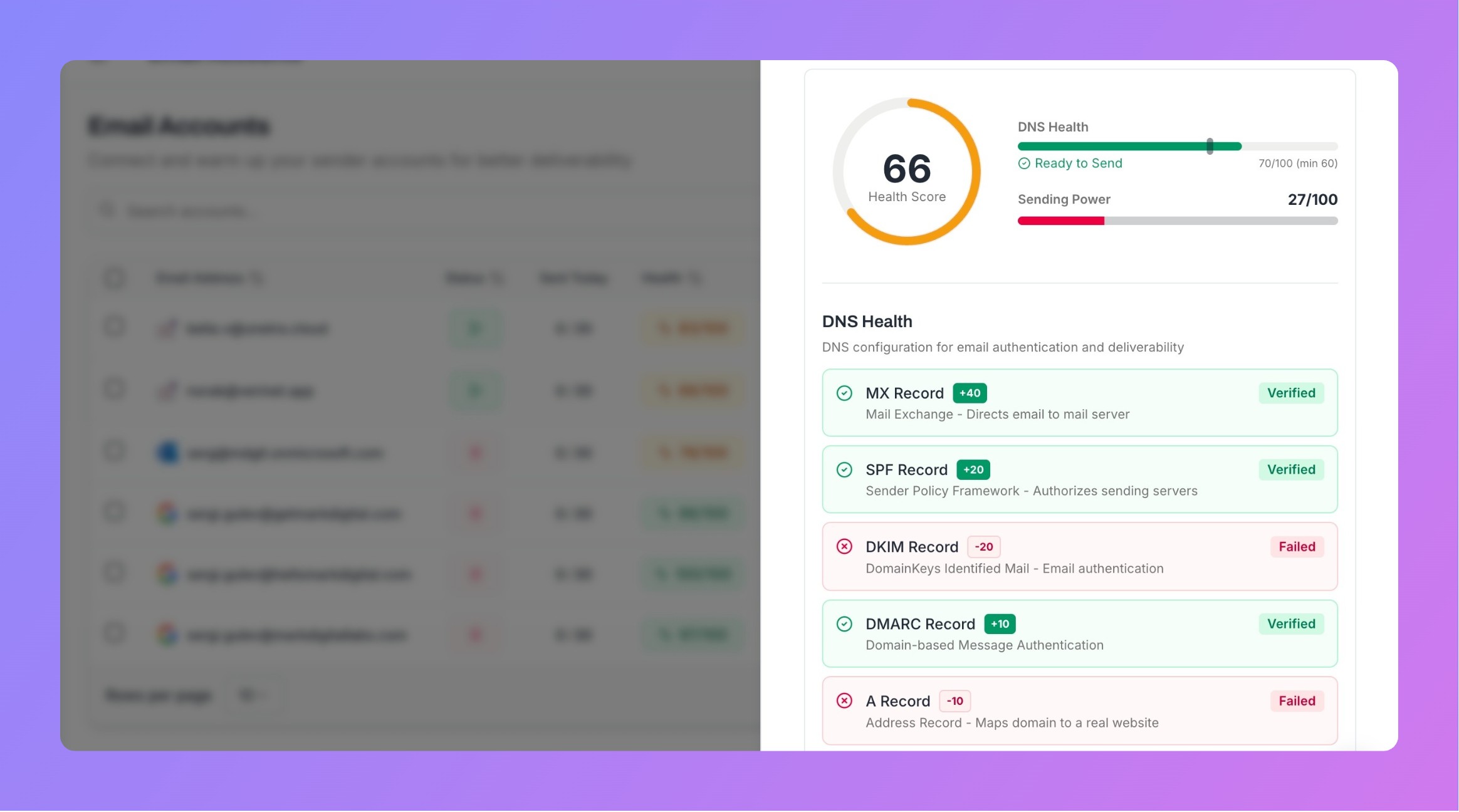
The Health Score combines two main components, and their relative importance shifts as your account matures and sends more emails. Our formula for total health score is simple - we extract an average from both underlying metrics:
This measures how well your domain's DNS records are configured for email deliverability.
Record | Points |
|---|---|
MX Record | 40 |
SPF Record | 20 |
DKIM Record | 20 |
DMARC Record | 10 |
A Record | 10 |
Total | 100 |
The raw DNS score (out of 100) is then weighted based on your account's lifecycle stage (see below).
At the start - all accounts have 100 sending power which may decrease through time due to certain events:
Sending success rate - What percentage of your emails are delivered successfully.
Bounce rate - Lower is better. Penalties start at 1% and scale progressively - exceeding 5% triggers a significant score drop, and above 10% is critical.
Warmup performance - If you have completed 20+ warmup sessions, your inbox placement rate factors in.
Blacklist status - Being listed on a blacklist results in sending power decrease.
MailBeast adjusts how much each component matters based on how many emails your account has sent. Therefore we readjust health metrics to better reflect your deliverability potential for a given account.
Why it works this way: A brand new account has no sending history to evaluate, so DNS setup carries more weight. As you build a track record, your actual performance becomes the stronger signal.
Range | Rating | What It Means |
|---|---|---|
90-100 | Excellent | Optimal deliverability. Keep doing what you are doing. |
66-89 | Good | Okay-performance with room for improvements. |
0-65 | Needs Improvement | Action required. Very high probability of burning that email account. Check bounces, blacklists & DNS records in your email account panel. |

Minimum for sending: Your DNS score must be at least 60 before MailBeast allows the account to send campaign emails. This protects your deliverability by ensuring basic authentication is in place.
Certain conditions add or subtract from your score:
All DNS records verified: +3 points
Account age 6+ months: +3 points
Perfect sending performance: +2 points
Blacklist: -40 points (severe - consider replacing an email or wait for delisting). In a very rare case it may help to request removal from blacklist at DNSBL provider, but it is way easier to replace an email rather trying to save it at this stage. We only decline that much points for blacklists that are actually impacting your results. For minor DNSBL blacklists only minor decrease may be given.
Warning-level blacklist: -10 points
Daily sending limit exceeded: -10 points
The single biggest improvement for new accounts. Make sure SPF, DKIM, and DMARC are all properly configured.
Check your account's DNS Health section for specific guidance.
See the DNS Infrastructure guides for setup instructions.
High bounce rates are the fastest way to damage your sending reputation. Penalties start at 1%, become noticeable above 3%, and above 5% your score drops significantly.
Verify email addresses before importing them into campaigns.
Remove invalid and risky leads from your lists.
Monitor your bounce rate in campaign analytics and pause if it spikes.
A properly warmed account has a track record of positive engagement that boosts the Sending Power component.
Enable warmup on all new accounts.
Do not skip or rush the warmup process.
Wait until the account reaches the "Maintaining" phase before launching campaigns.
Being listed on an email blacklist is one of the most damaging things that can happen to your sending reputation. To prevent that:
Send to verified, opted-in recipients.
Honor unsubscribe requests immediately.
Maintain low complaint rates.
Email providers are suspicious of erratic sending patterns.
Use warmup to maintain consistent daily activity.
Ramp up campaign volume gradually.
Do not suddenly increase your daily limits by large amounts.
Understanding Connection Status - Connection issues directly affect your health score.
Account Settings - Optimize your sending limits to maintain healthy sending patterns.
DNS Infrastructure Setup - Fix DNS issues to boost the DNS Health component.