When an account loses its connection, MailBeast shows a Disconnected or Lost OAuth badge in the Connection column and a fix button in the Quick Fix column. All sending (campaigns and warmup) stops until you reconnect.
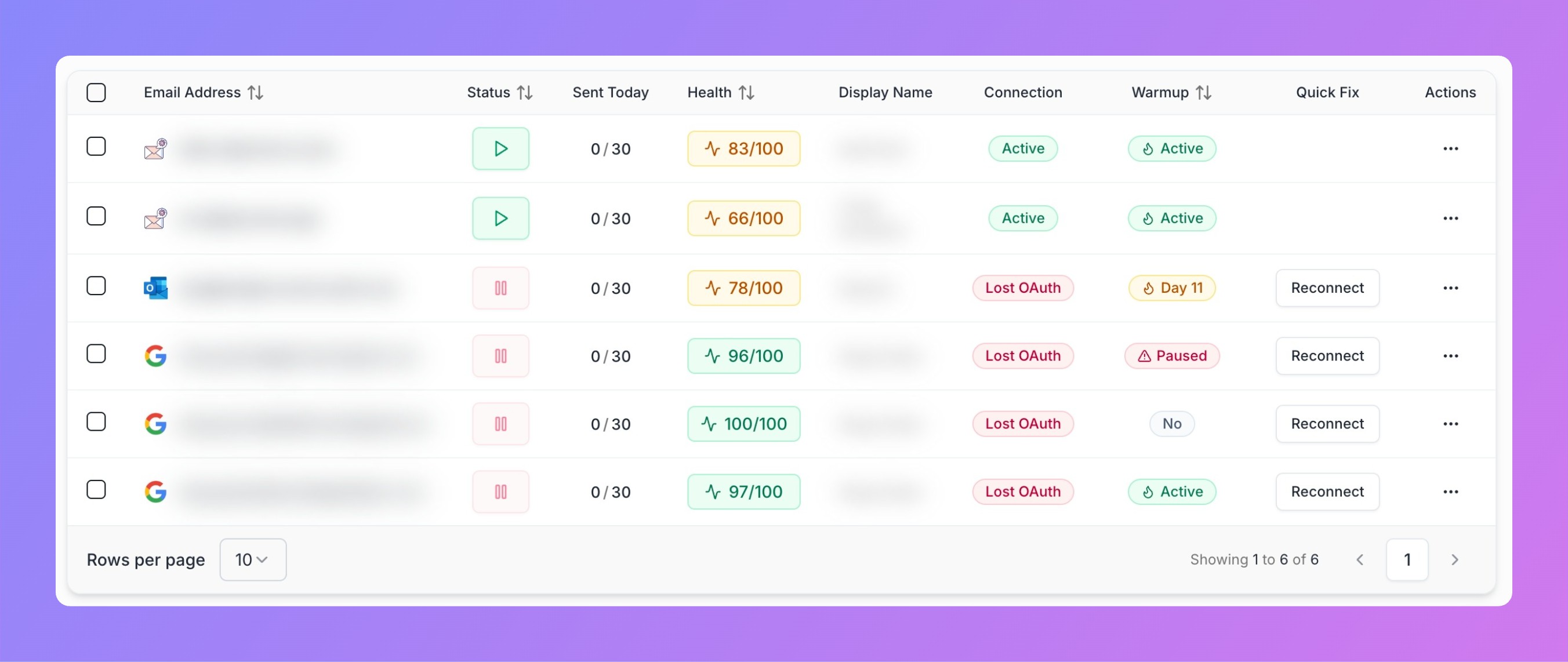
The Quick Fix column automatically shows the right action based on your account type and issue.
Find the account on the Email Accounts page.
Click Reconnect in the Quick Fix column.
Sign in with the same Google account and grant permissions.
MailBeast re-tests the connection automatically.

Tip: If you have multiple Google accounts in your browser, use an incognito window to avoid picking the wrong one.
IMAP disabled - Open Gmail > Settings > Forwarding and POP/IMAP > Enable IMAP.
Admin blocked the app - Ask your Workspace admin to set MailBeast as Trusted in API controls.
Last resort - Remove the account from MailBeast and re-add it.
Find the account on the Email Accounts page.
Click Reconnect in the Quick Fix column.
Sign in with your Microsoft credentials and re-grant permissions.
MailBeast re-tests the connection automatically.
Tip: Use an InPrivate window if multiple Microsoft accounts are signed in.
SMTP AUTH disabled - M365 Admin Center > Users > Active Users > select user > Mail > Manage email apps > enable Authenticated SMTP.
"Need Admin Approval" error - Your org requires admin consent. Ask your M365 admin to grant consent for MailBeast as explained during original account adding process.
Repeated disconnections - Check conditional access policies and mailbox storage quota.
Find the account on the Email Accounts page.
Click Edit Credentials in the Quick Fix column.
Verify and update SMTP/IMAP host, port, username, and password.
Click Save - MailBeast runs a connection test automatically.
Campaigns skip this account. Other accounts in the campaign continue.
Warmup is paused.
InboxHub stops receiving new emails.
Everything resumes automatically once reconnected.
Understanding Connection Status - What each status badge means.
Connect a Google Account - Full setup guide.
Connect a Microsoft Account - Full setup guide.
Account Health Score - How disconnections affect health.